Creating perio charts with VoiceboxMD on macOS is simple and efficient. Follow these steps:
- Enable Perio Mode:
- Click Left Command (⌘) + Shift + D to activate Perio Mode.
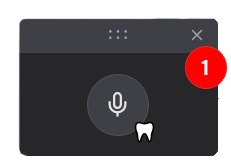
- A Tooth icon will appear next to the VoiceboxMD microphone icon, indicating that Perio Mode is active. (1)
- Start Dictation:
- Click the Microphone icon to begin recording.
- Clearly dictate your periodontal charting entries.
- End Dictation:
- When you’re finished, click the Microphone icon again to stop recording.
Tip: Use clear and concise language while dictating for the best transcription accuracy.