Updating VoiceboxMD #
Updating VoiceboxMD for Windows may resolve some errors and will install the latest new features and security updates.
Updating to the latest version is quick and easy – you will follow the same procedure as installing VoiceboxMD the first time. When you reinstall it, it will automatically override the previously installed version, but retaining your original settings. And since you have already installed VoiceboxMD previously, there is no need for any reconfigurations.
- Close VoiceboxMD by right-clicking on the VoiceboxMD icon in the system tray and selecting Logout.
- Download the latest version of VoiceboxMD here: voiceboxmd.com/docs/windows/client.
- After the download completes, double-click on the installer file and it will open the Setup Wizard. Follow the same instructions that you did during the initial installation.
Uninstalling VoiceboxMD #
We’d be sorry to see you go. Before you do, contact us and let us know how we can resolve any issues you may be having.
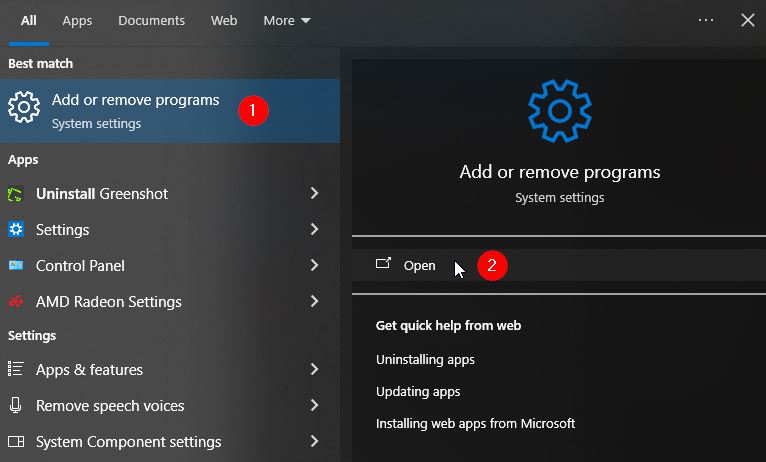
To uninstall VoiceboxMD, in the Windows Search box, type uninstall.

A number of options will be displayed. Select Add or remove programs (1) and then click Open (2).
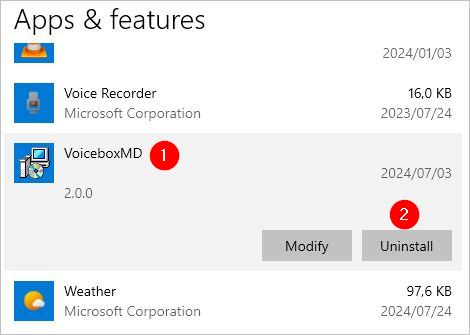
You will be redirected to the Windows Apps & features page. Scroll down to VoiceboxMD (1). Select it and then click Uninstall (2).
Follow the Windows instructions to uninstall VoiceboxMD. You may need to confirm that you wish to uninstall the app and allow Windows to make changes to your device.
After confirming you wish to uninstall VoiceboxMD, it may take a few minutes for Windows to configure the uninstallation.
Tip: For best and fastest results, make sure you are logged out of VoiceboxMD before you being uninstalling it.
Recommended microphones #
While most microphones work well with VoiceboxMD including the built-in mic on laptops, it is worth the investment of a more reliable and professional dictation microphone.
The microphones listed here are well tested and highly efficient in mid- to low-noise levels environments.
- Phillips Speech Mike 3700
- Phillips Speech Mike 3500
- Samson Go Mic
- AmazonBasics Portable USB Condenser Microphone
Speeding up your transcription workflows #
- After you install VoiceboxMD, right-click on the desktop shortcut and select Pin to taskbar to keep VoiceboxMD in quick and easy reach.
- You can add phrases on the Phrases tab in the Control Panel to create audio shortcuts for commonly-used sentences. For instance, you could teach VoiceboxMD to insert the words “First examination” when you say, “X1”.
- To reduce duplicating dictation effort, you may add stock comments and common diagnoses to VoiceboxMD’s language set on the Templates tab in the Control Panel.
- On the Vocabulary tab in the Control Panel, add obscure and hard-to-spell words to reduce transcription errors.
Audio commands for automatic text formatting #
* Below, the audio command you should speak aloud is in italics
Period – Adds .
Comma – Adds ,
Usage: The patient is a pleasant 56-year-old female who came in for followup of arthritis [comma] right hand [period]
Outcome: The patient is a pleasant 56-year-old female who came in for followup of arthritis, right hand.
New Line – Adds line break
Usage: The patient is a pleasant 56-year-old female who came in for followup of arthritis [comma] right hand [period] [new line]
Outcome: The patient is a pleasant 56-year-old female who came in for followup of arthritis, right hand.
New Paragraph – Adds double line breaks
Usage: The patient is a pleasant 56-year-old female who cames in for followup of arthritis [comma] right hand [period] [new paragraph]
Outcome: The patient is a pleasant 56-year-old female who came in for followup of arthritis, right hand.
Colon – Adds :
Usage: No carotid bruits[period] Lungs[colon] clear to auscultation bilaterally[period]
Outcome: No carotid bruits. Lungs: clear to auscultation bilaterally.
Hyphen – Adds –
Usage: History of present illness [hyphen] Patient is a 77-year-old woman who presents with a rash [period]
Outcome: History of present illness – Patient is a 77-year-old woman who presents with a rash.
Open parentheses – Adds (
Close parentheses – Adds )
Usage: No acute changes on head CT rules out a stroke and the patient is not demonstrating any signs of infection [open parentheses] no fever [comma] no elevated WBC [comma] no headache and neck pain[close parentheses] [period]
Outcome: No acute changes on head CT rules out a stroke and the patient is not demonstrating any signs of infection (no fever, no elevated WBC, no headache and neck pain).
Open Quote/Quotation – Adds ”
Close Quote/Quotation – Adds ”
Usage: The patient states that she got up in the morning to use the restroom, and she was staggering like she was [open quotation] drunk [close quotation] or [open quotation] drugged [close quotation] [period]
Outcome: patient states that she got up in the morning to use the restroom, and she was staggering like she was “drunk” or “drugged”.
Caps Lock – Uppercases the following sentence
Usage: The patient notes in the past she has used [caps lock] allegra [brief pause] with better relief.
Outcome: The patient notes in the past she has used ALLEGRA with better relief.
Undo – Removes the last printed transcription. Repeat as necessary.
Usage: The patient notes in the past she has used allegra with better relief [brief pause] and other medications
[undo]
Outcome: The patient notes in the past she has used allegra with better relief
Start Numerical Points – Adds 1.
New Point – Adds 2.
Usage: Swollen tongue [colon]
[start numerical point] Give patient corticosteroid to decrease inflammation and to protect against relapse after initial improvement.
[new point] Give patient antihistamine to block inflammation as well
[new point] ENT consult to rule out abscess or foreign object
Outcome: Swollen tongue:
1. Give patient corticosteroid to decrease inflammation and to protect against relapse after initial improvement.
2. Give patient antihistamine to block inflammation as well
3. ENT consult to rule out abscess or foreign object