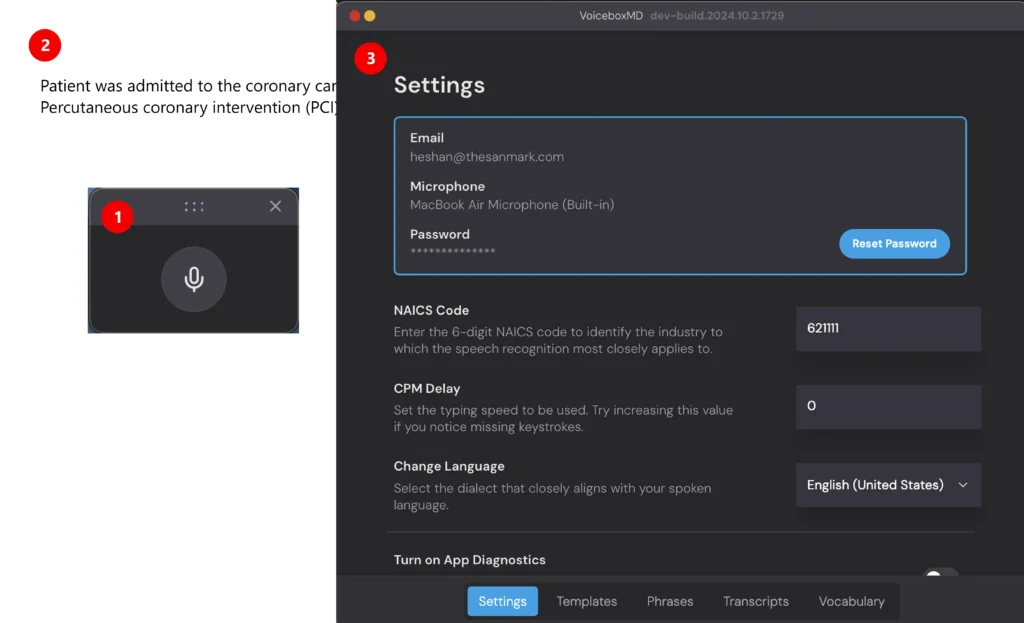
VoiceboxMD has three main components that make transcription simple and effective. Here’s what you need to know:
- Listener: The Listener is the part of VoiceboxMD that transcribes your speech into text. To activate it, click the microphone icon in the Top bar. Click again to turn it off when you’re finished.
- Document: Open any text editor (e.g.- Pages, MS Word, or Google Docs), where you want your transcription to appear. Place the cursor where you want to start, and VoiceboxMD will type your words as you speak.
- Control Panel: This is where you customize VoiceboxMD. Here, you can:
– Choose your microphone and language settings.
– Create templates and pre-recorded audio.
– Teach VoiceboxMD specific words and phrases.
Tip: To access the Control Panel, click on the VoiceboxMD icon in the top bar and select Settings.