To effectively create periodontal charts using VoiceboxMD, follow these structured steps.
- Open VoiceboxMD on your windows.
- Enable Perio Mode on VoiceboxMD:
- Press Left Ctrl + Shift + D to activate Perio Mode.
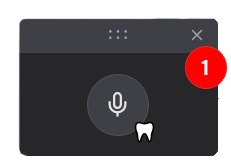
- A tooth icon will appear next to the VoiceboxMD microphone icon, indicating that Perio Mode is active. (1)
- Start Dictation:
- Click the Microphone icon to begin recording.
- Clearly speak your periodontal charting entries.
- End Dictation:
- Once you’ve completed your entries, click the Microphone icon again to stop recording.
For a visual demonstration, please refer to the video provided below.
By following these steps, you can streamline the process of creating periodontal charts using VoiceboxMD on your Windows system.